Writing clear, professional, and engaging content can take time. Whether you’re working on an article, business document, email, academic paper, or marketing content, having the right writing assistant can make the process much easier.
QuillBot is an AI-powered writing platform designed to help users rewrite, improve, summarize, and refine their text. Best known for its Paraphrasing Tool, QuillBot has expanded into a broader suite of writing and productivity tools.
But how useful is QuillBot, and is upgrading to QuillBot Premium worth it? Here’s a closer look.
What Is QuillBot?
QuillBot is an AI-powered writing assistant that helps users improve and transform written content.
Instead of focusing on only one task, QuillBot combines multiple writing tools in one platform. Users can rewrite sentences, correct grammar, summarize long passages, translate content, generate citations, analyze text for AI-generated content, and more.
This makes QuillBot useful for a wide range of users, including:
- Students and researchers
- Content writers and bloggers
- Marketing professionals
- Business professionals
- Freelancers
- Non-native English speakers
- Anyone who regularly writes or edits text
One of QuillBot’s biggest advantages is that you can start with a free account, making it easy to test the platform before deciding whether Premium is necessary.
Key QuillBot Features
1. Paraphrasing Tool
The QuillBot Paraphraser is arguably the platform’s best-known feature.
Paste your existing text into the tool and QuillBot can rewrite it while preserving the original meaning. This can be particularly useful when a sentence sounds repetitive, awkward, overly complicated, or simply needs a different tone.
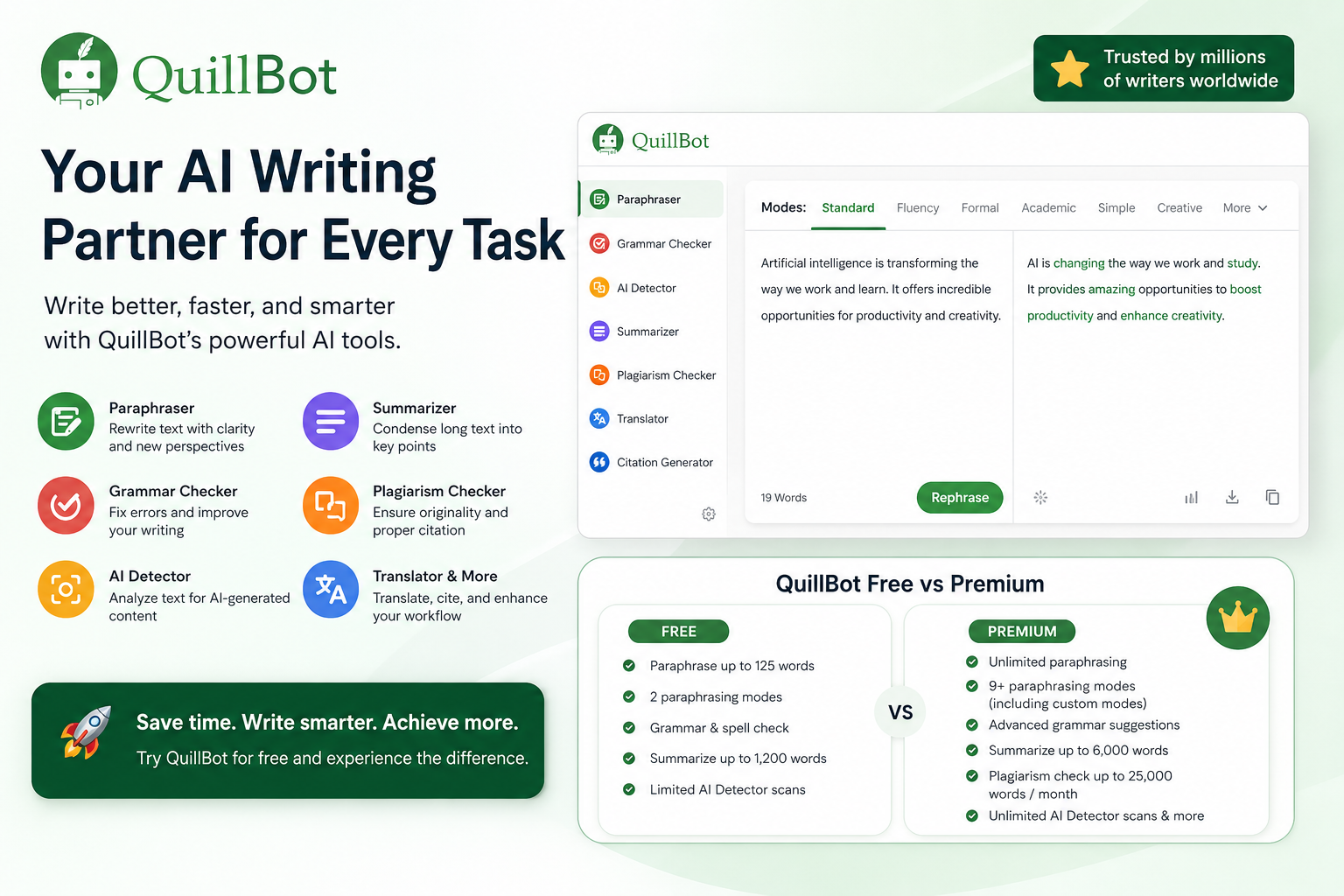
Free users can paraphrase up to 125 words at a time and access Standard and Fluency modes, while Premium significantly expands the available options.
2. Grammar Checker
QuillBot also includes a Grammar Checker for identifying grammar, spelling, and punctuation problems.
The free version handles many common writing errors, while Premium provides more advanced recommendations designed to improve clarity, sentence structure, conciseness, and style.
For people who frequently write emails, reports, articles, or other professional content, combining grammar checking and paraphrasing in the same platform can save considerable editing time.
3. AI Humanizer
QuillBot’s AI Humanizer is designed to transform stiff or unnatural-sounding writing into text that feels more natural and readable.
This can be useful when AI-assisted drafts sound repetitive or robotic. Rather than publishing the first generated draft, users can refine the wording and tone to better match their intended audience.
As with any AI rewriting tool, the final result should still be reviewed manually for accuracy and context.
4. AI Detector
QuillBot includes an AI Detector that analyzes text for patterns associated with AI-generated writing.
The tool can be useful as an additional signal when reviewing content, although AI detection technology should not be treated as definitive proof of how a piece of text was created.
Free accounts have limited access, while Premium users receive expanded AI Detector usage.
5. Summarizer
Reading long documents can be time-consuming. QuillBot’s Summarizer helps condense longer pieces of text into shorter, easier-to-review versions.
Free users can summarize texts of up to 1,200 words, while Premium increases the limit to 6,000 words and provides additional customization options.
This feature can be especially useful for research, reports, articles, and other information-heavy documents.
6. Plagiarism Checker
Premium users also gain access to QuillBot’s Plagiarism Checker.
It can identify potential similarities between your text and existing sources, helping users spot sections that may require rewriting or proper attribution.
QuillBot Premium currently includes plagiarism checking for up to 25,000 words per month.
7. Translator and Citation Tools
QuillBot goes beyond basic rewriting with tools for translation and citation generation.
These features can be particularly useful for students, researchers, international professionals, and writers working with information from multiple sources.
Instead of switching between several websites, many common writing tasks can be handled within the QuillBot ecosystem.
QuillBot Free vs Premium
One of the best things about QuillBot is that you don’t necessarily need to pay immediately.
The Free plan provides enough functionality to test its core writing tools. You can use basic paraphrasing, grammar checking, summarization, AI detection, and several other features with usage limits.
QuillBot Premium is designed for people who use these tools more frequently.
Premium benefits include:
- Unlimited paraphrasing
- Access to additional paraphrasing modes
- Advanced grammar recommendations
- Tone insights
- Unlimited AI Detector scans
- Expanded AI Humanizer access
- Summaries of up to 6,000 words
- Plagiarism checking
- Faster processing
- Higher limits across several QuillBot tools
For occasional rewriting, the free version may be enough. For users who write every day, Premium removes many of the restrictions that can interrupt a writing workflow.
Is QuillBot Premium Worth It?
That depends largely on how often you write.
If you only need to rewrite a few sentences occasionally, QuillBot Free offers a good starting point.
Premium becomes more attractive if you regularly create articles, reports, academic content, marketing copy, business documents, or other long-form writing.
The biggest advantage isn’t necessarily one individual feature. It’s having paraphrasing, grammar correction, summarization, AI detection, humanization, and plagiarism checking available within the same ecosystem.
For frequent writers, that convenience can translate into meaningful time savings.
Who Should Consider QuillBot?
QuillBot is particularly suitable for people who already have ideas or drafts but want help improving how those ideas are expressed.
Content creators and bloggers can use it to refine drafts and explore alternative wording.
Students and researchers can benefit from summarization, citations, grammar checking, and writing assistance.
Professionals can use QuillBot to polish emails, reports, presentations, and business communications.
Non-native English speakers may find the grammar, fluency, and paraphrasing tools particularly helpful when trying to make English writing sound more natural.
Pros and Cons of QuillBot
Pros
- Free version available
- Easy to use
- Powerful paraphrasing functionality
- Multiple writing tools in one platform
- Useful grammar and style suggestions
- AI Detector and AI Humanizer included
- Summarization and citation tools
- Premium removes many usage restrictions
- Suitable for both short and long-form writing
Cons
- Free Paraphraser has a 125-word limit
- Many advanced features require Premium
- AI-generated suggestions still require human review
- Occasional users may not need a paid subscription
QuillBot vs Traditional Writing Tools
Traditional grammar checkers generally focus on correcting mistakes.
QuillBot takes a broader approach. It can correct text, but it can also rewrite, summarize, humanize, translate, analyze, and transform content.
That makes it more useful for users looking for an all-in-one AI writing assistant rather than simply a spelling and grammar checker.
The Paraphraser remains a particularly strong reason to consider QuillBot if rewriting and improving existing content is part of your everyday workflow.
Final Verdict: Should You Try QuillBot?
QuillBot is worth trying if you regularly write, rewrite, or edit digital content.
Its free plan makes the decision relatively easy because you can test many of its core features without immediately purchasing a subscription.
For occasional writing tasks, Free may be sufficient. For students, professionals, marketers, bloggers, researchers, and other frequent writers, QuillBot Premium provides higher limits and advanced tools that can make the writing and editing process significantly more efficient.
If you frequently find yourself rewriting sentences, fixing awkward wording, checking grammar, or summarizing long documents, QuillBot brings those tasks together in one convenient platform.
Try QuillBot
You can start with QuillBot for free and explore the Paraphraser, Grammar Checker, AI Detector, Summarizer, and other writing tools before deciding whether Premium is right for you.
Disclosure: This article may contain affiliate links. If you purchase through one of these links, we may earn a commission at no additional cost to you.